A sample library manager for Mac
SampleStack is a sample browser and library manager for macOS. Point it at the folders you already have, from Splice downloads to twenty years of drum kits, and it gives you one window to browse, audition, tag, rate, and search them. Nothing is moved or copied to do it.
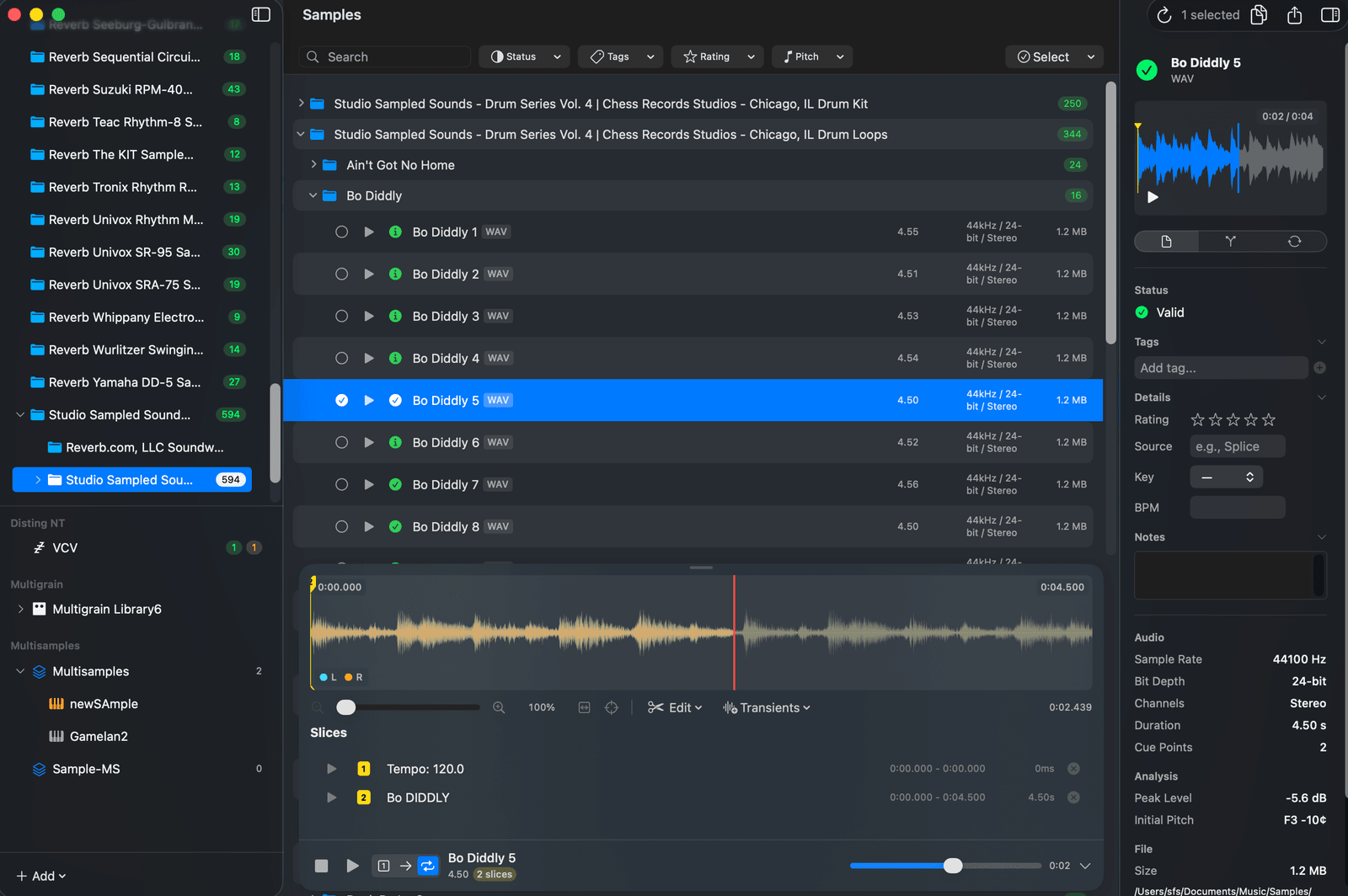
Use the folders you already have
Add any folder as a library and SampleStack reads it in place. Your folder tree shows in the sidebar exactly as it sits on disk, and a click on any folder filters the browser to it. Libraries can live on an internal drive, an external drive, or an SD card.
Large libraries open quickly because SampleStack scans lazily: it lists the files first and analyses each one when you reach it. Waveforms are cached to disk, so a folder you have browsed once opens straight away next time.
Audition one-shots and loops
Select a sample and the floating player starts. Arrow keys move through the list and the spacebar plays and stops, so you can work through a folder of kicks without touching the mouse. The player has three modes: One Shot plays once, Continuous plays to the end, and Loop repeats the file or a selection, which suits drum loops and pads.
Open the expanded player for a zoomable stereo waveform with cue points and slices. The sample editor page covers what you can do from there.
Tags, ratings, categories, and notes
Every sample can carry tags, a star rating, a category, a BPM, a musical key, a source, and free-form notes. Select several samples and add or remove a tag across all of them at once.
Categories are a shared, editable list with their own icons, so kicks, snares, vocals, pads, and FX look the same across every library. Tags and ratings each get a browser in the sidebar: click a tag or a star rating and the view filters to it.
BPM is filled in for you. SampleStack detects the tempo of loops automatically, which is covered on the BPM and pitch detection page. Key is a field you fill in yourself, because the app does not detect musical key.
Search and filter
The search bar filters by filename as you type, and the filter bar narrows by category, tag, and rating. Pin a library, folder, or instrument to the bottom bar and it stays one click away during a session.
From the library to wherever the sample goes
A library in SampleStack is the start of the path, not the end. Drag a sample into your DAW, copy it to a hardware collection and let the batch converter fix the format, or drop a folder of one-shots into a multisample instrument.
Further reading
- How to organize a sample library that scales
- Use Splice and other downloaded samples in SampleStack
- Best sample manager for Mac
More features
- BPM and pitch detection Loops arrive with their tempo read. One-shots arrive with their root note.
- Drag into your DAW A companion window that sits beside Ableton Live, Logic Pro, or FL Studio.
- Sample editor and slicer Chop, slice, fade, and loop samples without leaving the browser.
- Batch sample converter Convert sample rate, bit depth, and channels for a whole folder at once.
Sample library manager FAQ
Short answers to what people ask about this part of SampleStack.
Does SampleStack move or copy my samples into its own library?
No. SampleStack reads your folders where they are. Tags, ratings, and notes are stored by SampleStack, keyed to each file's path, and your audio files are not changed by browsing or tagging.
How big a sample library can SampleStack handle?
Libraries are scanned lazily and waveforms are cached to disk, so folders with tens of thousands of samples stay responsive. The first scan of a very large drive takes longer than later visits.
Can SampleStack find samples by key?
You can enter a key for any sample and see it in the inspector, but SampleStack does not detect musical key automatically. BPM is detected automatically.
Have another question? Drop us a line or visit the help page.
Stop wrestling with sample formats.
Get SampleStack.
Try free for 7 days. No credit card required.
Get SampleStack